Push WordPress pages from staging to live. Without overwriting your database.
Selectively push the exact pages, custom fields, and media you choose from staging to production — leaving live WooCommerce orders, comments, and form entries untouched. Every sync is HMAC-secured and backed by automatic rollback.
Editing directly on production is a gamble. Manual migration is a chore.
Before
Manual migration, every single time
A staging-first workflow is safer — but copying changes over by hand means repeating the same tedious steps, and hoping you didn't miss one.
Export the page from staging by hand
Re-enter meta fields, SEO data, and taxonomies
Re-upload media and fix broken references
Hope nothing breaks on production
After — with EZ Page Sync
One click, everything included
Edit on staging, click sync, and the same content lands on production — meta, ACF fields, SEO data, taxonomies, and media included.
Edit the page on staging as usual
Click "Sync to Production"
Meta, media, and taxonomies land automatically
Automatic rollback backup if anything's off
Why people use it
Page updates should feel boring
No copy-pasting between sites. No "did the images come over?" No panicking when something looks off. Edit on your test site, click sync, done.
Staging (Source)
Active
Page textModified
ImagesModified
SEO settingsModified
Page layoutModified
Production (Target)
Synced
Page textUp to date
ImagesUp to date
SEO settingsUp to date
Page layoutUp to date
The whole page
Everything moves together
Text, images, SEO settings, page layout, custom fields, tags — the whole page comes over in one click. Not just the headline.
Both sites verify each other
Always on
Only your sites can talk
Locked
Secrets stored encrypted
Safe
Locked tight
Safe by default
Your sites check each other's signature on every sync. Nobody else can push to your live site, even if they know its address.
Yesterday6:18 PM
Today11:02 AM
Now2:14 PM
One-click undo
Undo a bad sync
We save a copy of the page before we change anything. Don't like the result? Put it back in one click.
preview-diff.html
+"Ready for WordPress 6.x"
Add
~hero-banner-new.webp
Swap
!Check: 2 orphan tags
Notice
No surprises
See it before you do it
Run a no-risk preview that shows exactly what will change on your live site — without changing anything yet.
Workflow
Four steps, every time
No complicated migrations, no terminal commands. A frictionless pipeline straight from staging to production.
01
01
Edit on staging
Make page changes the same way you always do — nothing changes about your editing workflow.
02
02
Click sync
Your sync request is securely signed and verified by your live site before anything is written.
03
03
Production updates
Your content, meta fields, and media land safely on production. We also take a rollback snapshot just beforehand.
04
04
Restore if needed
If something looks wrong, restore the previous version in one click from the Rollback Manager.
Product Tour
See it inside wp-admin
No new tools to learn — the whole workflow lives in a tabbed dashboard right in your WordPress admin.
yoursite.com/wp-admin/admin.php?page=ez-page-sync
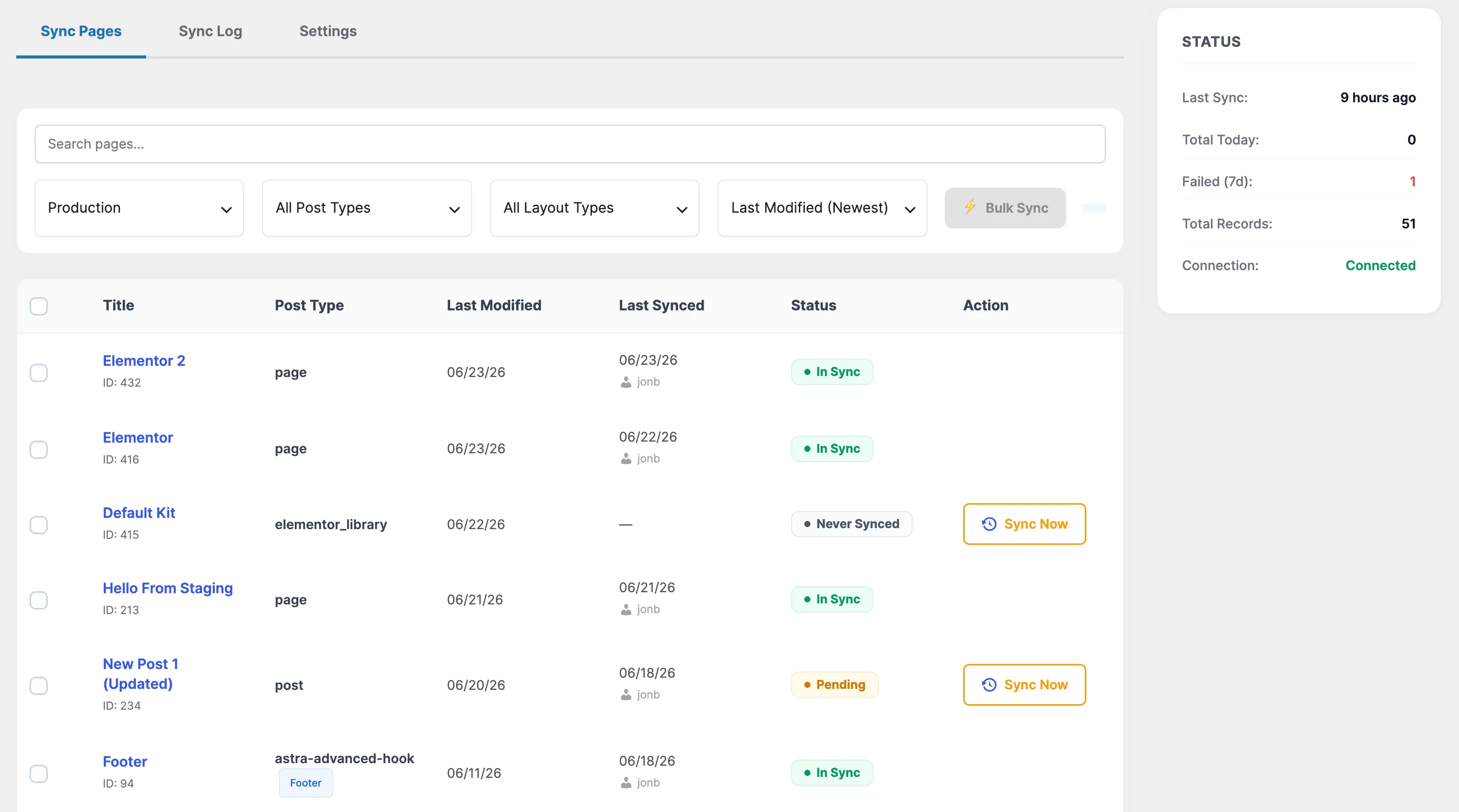
Every syncable page at a glance — status badges, last-synced times, and one-click sync per page.Read the docs
yoursite.com/wp-admin/admin.php?page=ez-page-sync
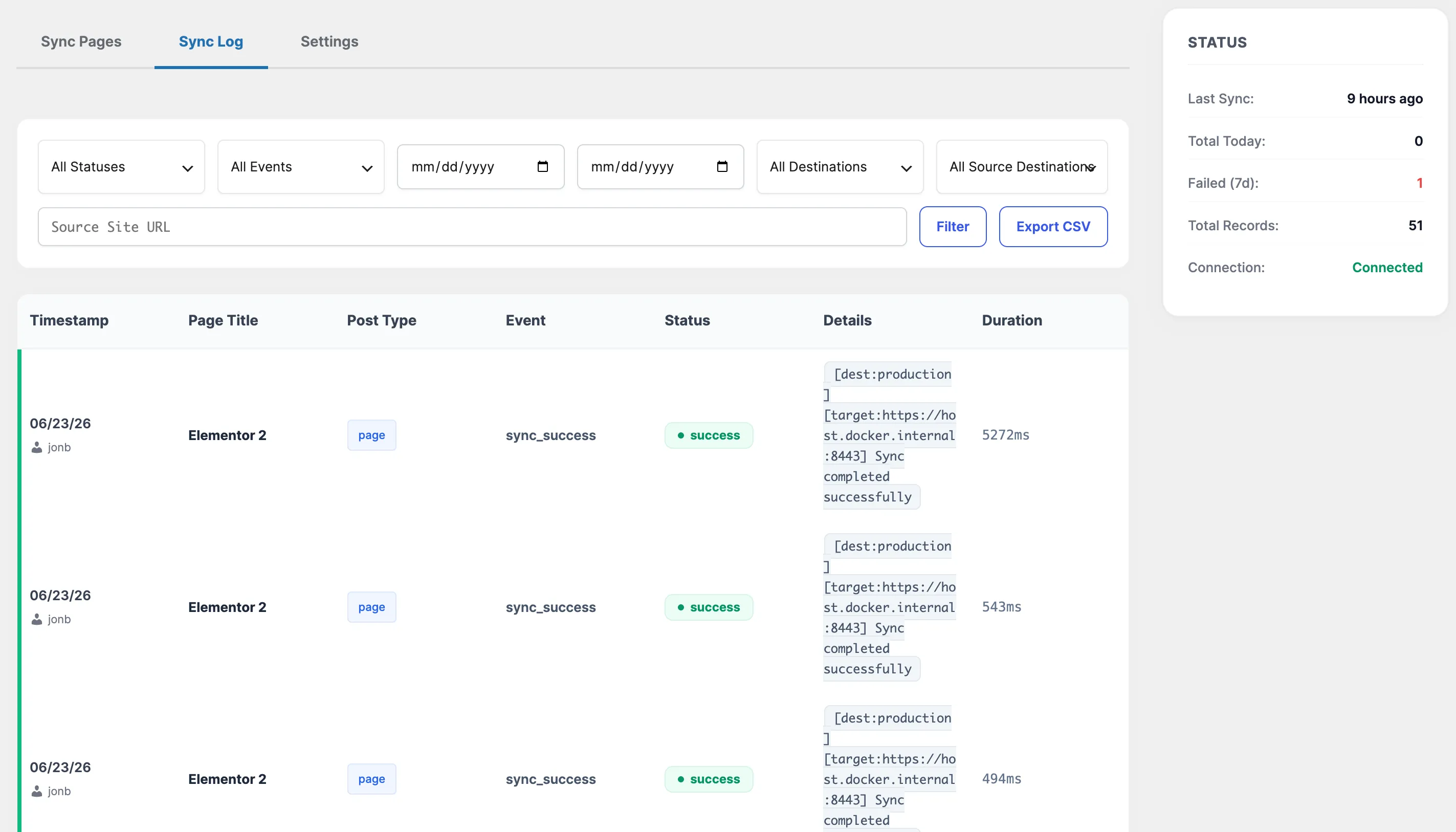
A full audit trail of every sync — filter by status, event, or date, and export to CSV.Read the docs
yoursite.com/wp-admin/admin.php?page=ez-page-sync
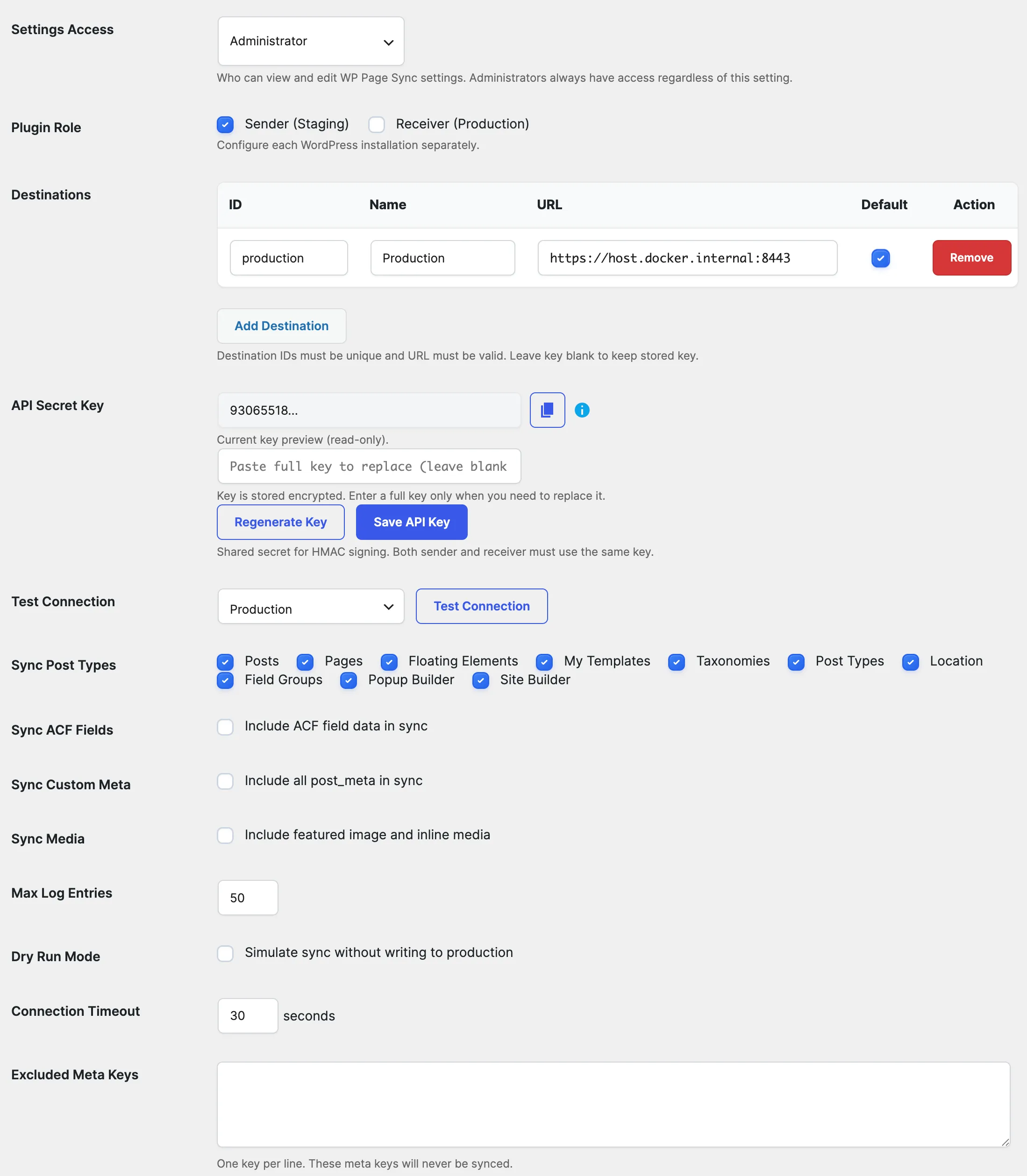
Roles, destinations, the encrypted API key, and sync toggles — all configuration in one tab.Read the docs
Security isn't an afterthought
This plugin moves data between live WordPress sites. It's built like that's a serious thing to do — every request is cryptographically verified before anything touches your production database.
Every sync request is signed and verified before any data is written.
Replay-protected nonces
One-time nonces with a 10-minute TTL stop replayed requests cold.
IP whitelisting
CIDR-notation IP whitelist with trusted proxy support for reverse-proxied setups — included with any paid plan.
Rate limiting
60 sync requests per hour per IP, enforced server-side.
HTTPS enforced
Plain HTTP is rejected outside local debug environments.
Encrypted secrets at rest
The API secret key is stored with AES-256-GCM authenticated encryption.
Pricing
Free to start. Priced for how you work.
Free covers unlimited single-destination sync for good. Premium unlocks everything else, billed annually per site count.
Freelancer
$89/ yr
1 site
For solo developers managing a single staging → production pipeline.
Everything in Free
Multi-destination sync
ACF, Yoast, Astra & Elementor sync
Custom post types & taxonomies
Rollback Manager UI
Most Popular
Agency
$199/ yr
5 sites
For agencies running staging → production syncs across client sites.
Everything in Freelancer
Bulk sync
IP whitelist
Settings access restriction
Extended log retention
CSV export
Unlimited
$399/ yr
Unlimited sites
For shops running sync across an unlimited number of client sites.
Everything in Agency
Unlimited destinations
Unlimited sites
Priority support
Comparison
Compare Free vs. Premium
Feature
Free
Premium
Sync destinations
1
Unlimited
Plugin role
Sender or Receiver
Both simultaneously
Post types
Page, Post
Any custom post type
ACF / custom meta / Yoast / taxonomy sync
—
Included
Elementor sync
—
Included
Astra theme meta sync
—
Included
Media sideloading
—
Included
Bulk sync
—
Included
IP whitelist
—
Included
Settings access restriction
Editors & Admins
Any role / specific user
Rollback Manager UI
—
Included
Log retention / CSV export
Capped at 50 rows
Extended, unlimited, CSV export
Free includes unlimited single-destination page/post sync with full HMAC security — no time limit, no credit card. Download the Free version →
FAQ
Questions, answered
Can I sync just one page instead of the whole site?
Yes — that's the entire point. Select a single page, post, or custom post type and only that item, along with its meta and media, is pushed. Nothing else on production is touched.
Will syncing overwrite my live database?
No. EZ Page Sync never drops or replaces tables. It updates only the specific post rows you push, using WordPress core APIs — so live orders, comments, users, and form entries are never at risk.
How is this different from my host's “Push to Live” button?
Host Push-to-Live copies the whole database, wiping any live activity created since your staging clone. EZ Page Sync pushes only the pages you choose, with an automatic pre-sync snapshot for one-click rollback.
Does my content pass through a third-party service?
No. Sync happens directly between your two sites over an authenticated REST connection. There's no SaaS platform, external dashboard, or cloud account in the middle — your data never leaves your own servers.
Does this work with Elementor, ACF, and Yoast?
Yes — Elementor layouts, Advanced Custom Fields, and Yoast SEO metadata all sync as dedicated Premium features, including image and template references inside Elementor data.
If I downgrade, do I lose my settings?
No. Configuration beyond the Free tier's caps — extra destinations, roles, custom post types — is never deleted from storage. It's simply inactive until you upgrade again, at which point it reactivates automatically.
Is it safe to run against a live production site?
A snapshot is captured before every sync by default, and Auto Rollback can restore production automatically if a sync fails. You can also run Dry Run or Preview mode first to see what would change before committing anything.
Can I sync to more than one destination?
Free syncs to a single destination. Premium unlocks multi-destination sync, including relay chains where a site is both a sender and a receiver.
Does the plugin need to be installed on both sites?
Yes. Both the staging (sender) and production (receiver) sites need the plugin active with the same shared API Secret Key — that's what HMAC-signs and verifies every sync request.
What are the minimum requirements?
WordPress 6.9+, PHP 8.1+, and MySQL 5.7+ or MariaDB 10.3+ on both the staging and production sites.